
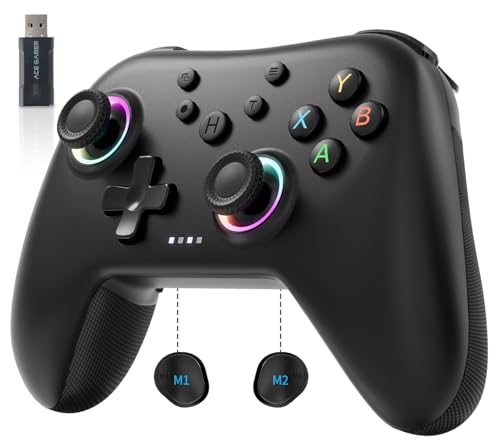


AceGamer Aurora 2.4G Wireless Controller for PC Windows/Switch 2/Switch/Steam/iOS/Android, PC Gamepad with Hall Effect Joystick, Programmable Back Button,Linear Resonant Actuator,Turbo, Black
[Multi-platform compatibility]: The AceGamer Wireless Bluetooth Controller is compatible with Windows 10/11, Switch 2, Switch, Android, iOS, and Steam Deck.1000Hz Polling Rate,1000mAh Battery,Note: The controller is not compatible with the Xbox series, but can play Xbox games on PC.
[Three connectivity modes/two input modes]: The AceGamer PC controller is equipped with a 2.4G wireless dongle that enables Bluetooth connectivity, wired USB-C connectivity, and 2.4G wireless receiver connectivity. You can freely switch the ABXY buttons according to your own habits. The default setting is XBOX button mode. If you are used to Switch buttons, you can long press the “Turbo+Screenshot” button to switch modes; this setting is not saved after powering off.
[Linear Triggers/Hall Effect Joystick]: The Aurora PC Controller comes with linear triggers and two trigger travel switches on the back of the controller, allowing players to adjust the trigger to full and half travel via a toggle switch to further enhance the gaming experience. Designed for “no-dead-angle” and “no-drift” joystick performance, the Aurora Wireless Controller is equipped with a Hall effect joystick that not only extends the joystick’s lifespan but also enables a latency-free and precise, immersive gaming experience.To enhance the experience for FPS players, this controller features a dead zone-free mode, which can be activated by holding down the “TURBO + L3/R3” buttons.
Original price was: £24.99.£19.99Current price is: £19.99.
[Multi-platform compatibility]: The AceGamer Wireless Bluetooth Controller is compatible with Windows 10/11, Switch 2, Switch, Android, iOS, and Steam Deck.1000Hz Polling Rate,1000mAh Battery,Note: The controller is not compatible with the Xbox series, but can play Xbox games on PC.
[Three connectivity modes/two input modes]: The AceGamer PC controller is equipped with a 2.4G wireless dongle that enables Bluetooth connectivity, wired USB-C connectivity, and 2.4G wireless receiver connectivity. You can freely switch the ABXY buttons according to your own habits. The default setting is XBOX button mode. If you are used to Switch buttons, you can long press the “Turbo+Screenshot” button to switch modes; this setting is not saved after powering off.
[Linear Triggers/Hall Effect Joystick]: The Aurora PC Controller comes with linear triggers and two trigger travel switches on the back of the controller, allowing players to adjust the trigger to full and half travel via a toggle switch to further enhance the gaming experience. Designed for “no-dead-angle” and “no-drift” joystick performance, the Aurora Wireless Controller is equipped with a Hall effect joystick that not only extends the joystick’s lifespan but also enables a latency-free and precise, immersive gaming experience.To enhance the experience for FPS players, this controller features a dead zone-free mode, which can be activated by holding down the “TURBO + L3/R3” buttons.
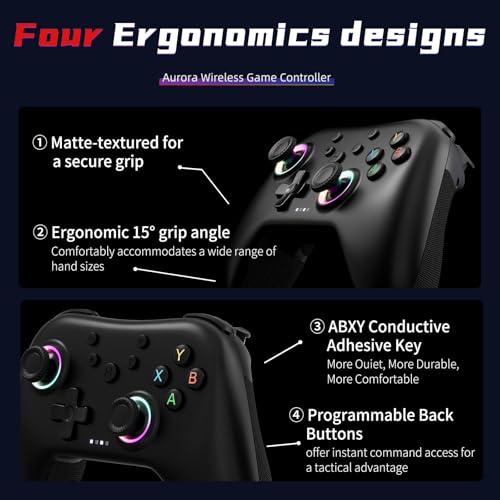
[Programmable rear buttons and anti-touch buttons]: The AceGamer PC controller has two programmable buttons on the back to simplify complex skill operations with the M1/M2 buttons: (M1/M2 = any A/B/X/Y/L/ZL/R/ZR/L3/R3/D-pad, up to 16 buttons). The buttons on the back are equipped with an anti-touch switch, and the toggle switch prevents accidental touching of the buttons on the back, allowing players to keep their fingers free and immerse themselves in the gaming experience with complete peace of mind.
[Notes] ① If the trigger or joystick drifts or other conditions occur, you can try the following method. With the device turned on, press the “View+Menu+Home” buttons simultaneously for 2 seconds to enter calibration mode. Press L2 and R2 down 2-3 times each and shake the left and right joysticks 2-3 times each; then press the “A” button to complete the calibration. ② If the controller fails to function properly, try pressing the reset button on the back of the controller to reset it. ③ If the issue persists, please feel free to contact us.
User Reviews
Be the first to review “AceGamer Aurora 2.4G Wireless Controller for PC Windows/Switch 2/Switch/Steam/iOS/Android, PC Gamepad with Hall Effect Joystick, Programmable Back Button,Linear Resonant Actuator,Turbo, Black”
You must be logged in to post a review.


There are no reviews yet.